
Deploying laptops to a remote workforce is one of the most consequential decisions a startup will make in its early stages. Get it right, and your team hits the ground running. Get it wrong, and you’ll spend months dealing with underperforming hardware, frustrated employees, and unexpected replacement costs.
This guide is designed to help startup founders and operations managers think through device selection systematically, from understanding job role requirements and display specifications, to navigating the laptop lineups offered by Lenovo, HP, Dell and Apple.
What is Device Lifecycle Management and Where Hardware Selection Fits in
Before diving into the specs and model, it’s worth understanding the broader framework in which laptop selection sites operate in Device lifecycle management.
Device Lifecycle Management refers to the end-to-end process of planning, procuring, deploying, maintaining, and eventually retiring devices within an organization. For startups deploying laptops to a distributed team, a structured DLM approach prevents reactive purchasing decisions and builds a foundation that scales.
The typical stages of DLM look like this:
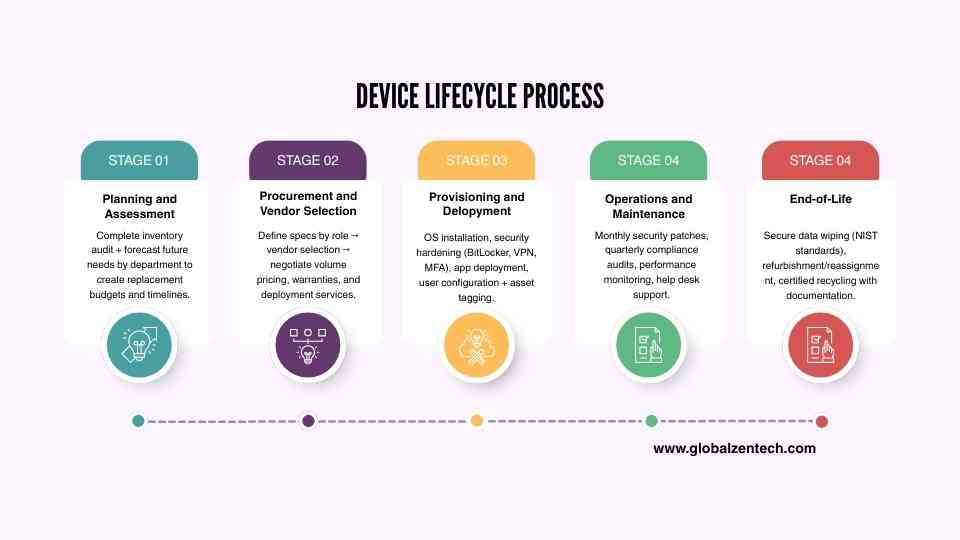
- Planning and Requirements Definition: This is where laptop selection begins. Before any purchase order is raised, you need to identify what your workforce actually needs from their devices, broken down by role, workflow, and working environment.
- Procurement: Once requirements are defined, you source devices that meet those requirements within budget. Procurement decisions should account for warranty terms, vendor support in your target regions, and bulk pricing.
- Deployment: This stage covers enrolling devices into Mobile Device Management (MDM) or Unified Endpoint Management (UEM) platforms, configuring software, and shipping hardware to remote employees.
- Maintenance and Support: Ongoing updates, troubleshooting, and remote IT support. For remote teams, this often means leaning on cloud-based management tools to push updates and enforce security policies without physical access to devices.
- Refresh and Retirement: Business laptops typically have a productive lifespan of three to four years, depending on workload intensity. At the end of this cycle, devices are either refreshed, repurposed, or decommissioned and securely wiped.
Defining the specification and requirements is arguably the most important step. A mistake made here compounds through every stage that follows. Choosing an underpowered device for a developer or a heavy workstation for an admin role wastes budget and affects productivity across the entire team.
Steps in Assessing Requirements for Business Laptops
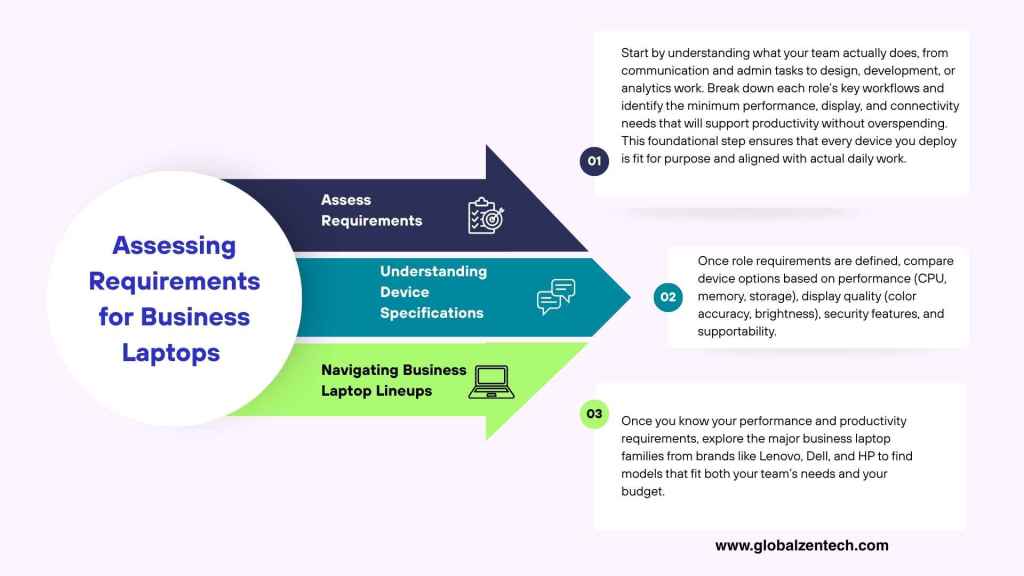
Step 1: Assessing Requirements by Job Role and Scope
Not everyone on your team needs the same machine. The first step in building a device matrix is mapping roles to workload profiles. Here’s a practical framework for doing that.
Define Workload Intensity:
Think of workloads in three broad tiers:
- Light to Moderate (Administrative and Support Roles): These roles primarily work on browser-based projects, including email, project management tools, spreadsheets, and video calls. These roles don’t demand powerful processors or large amounts of RAM, but they do benefit from long battery life, a comfortable keyboard, and a quality display for extended screen time.
- Moderate to Heavy: Roles that require dedicated software, such as enterprise software and work requiring multiple browser tabs open, design tools, conference calls, and collaboration tools. These users benefit from a mid-range processor, at least 16GB of RAM, and a display with good color accuracy for reviewing creative assets and reporting dashboards.
- Heavy ( Technical Roles): Software developers, data analysts, video editors, graphic designers, and IT professionals require the most from their hardware. These roles typically demand multicore processors, 16 to 32GB of RAM or more, dedicated storage for large files, and, for creative roles, a display capable of accurate color representation across a wide gamut.
Building a Device Requirements Matrix
Once you’ve mapped roles to workload tiers, document the following for each role:
- Processor requirement: Everyday tasks vs. compiling code or rendering video
- RAM:16GB is a baseline; 32GB is practical for most knowledge workers, especially in the age of AI; 32GB+ for power users
- Storage: SSD is non-negotiable for remote work; capacity depends on whether files live locally or in the cloud.
- Display Size and Quality: Discussed in detail below
- Battery life: Critical for roles without a fixed desk setup
- Connectivity: Thunderbolt ports, USB-A legacy ports, SD card slots, depending on role
- Security features: TPM chip, fingerprint reader, IR camera for facial recognition
- Weight and portability: Is the employee always at a desk, or do they move frequently
This device matrix becomes your procurement spec sheet and ensures that every purchase decision is role-driven rather than arbitrary.
Step 2: Understanding Device Specifications and Why the Display Matters
Display quality is one of the most frequently overlooked aspects of remote work hardware selection, and one of the most impactful on day-to-day productivity. When your team is working eight or more hours a day on a screen, the display is the primary interface between the employee and their work.
Here are the key display specifications to evaluate:
| Specification | Description |
| Screen Resolution | Resolution determines how much content can fit on the screen and how sharp text and images appear. 1. Full HD (1920×1080): is the standard and is adequate for most roles. 2. 2k (2560×1440) or 2.8k (2560 x 1440): This is perfect for roles involving detailed design work, data analysis with large spreadsheets, or development with multiple windows open simultaneously. These resolutions provide a meaningful difference in visual clarity compared to HDF panels. |
| Color Accuracy and Color Gamut | Color accuracy is measured by how closely a display reproduces colors relative to a standardized color space. The two most common reference points are sRGB ( the standard for web and general use) and DCI-P3 (the wider gamut standard used in creative and media production workflows). – For general roles, a display that covers 100% of the sRGB color space is sufficient. – For marketing professionals reviewing brand assets, designers, photographers, or video editors, a display covering 90% or more of the DCI-P3 gamut ensures that what they see on screen accurately reflects how content will appear to the audience. Poor color accuracy in creative roles leads to real business consequence, assets that look correct on your teams screen may appear washed out, overstaurated, or incorrectly balanced when published or printed. |
| Brightness (Measured in Nits) | Brightness is measured in nits. For employees working in a controlled indoor environment, 250 to 300 nits is generally comfortable. However, remote teams don’t usually work in ideal lightning conditions; they may be at a home office with a window behind them, at a co-working space with overhead lighting, or occasionally working outdoors. For these scenarios, a display capable of 400 nits or above is noticeably better. High-brightness panels (500 nits or more) are particularly valuable for employees who frequently move between environments. Some premium displays also feature anti-glare coatings that reduce reflective light independently of brightness levels. |
| Anti-Glare vs Glossy Panels | Matte anti-glare panels diffuse light and reduce reflections, making them easier to use in varied lighting. Glossy panels offer richer contrast and more vivid colors but can become difficult to use near bright light sources. For remote workers who don’t control their environment, anti-glare panels are generally the safer default. |
How Screen Quality Affects Productivity
The link between display quality and productivity is well-documented in ergonomics research. Eye strain, headaches, and fatigue are directly influenced by factors like screen brightness, flicker rate, and blue light emission. A poor-quality display forces the eye to work harder to resolve text and distinguish contrast, leading to faster cognitive fatigue over long working sessions.
For employees on video calls, a bright, color-accurate display also helps them perceive visual cues from their colleagues more accurately, which matters for communication-heavy roles. And for developers and analysts who spend hours reading text, a high-resolution display with clear subpixel rendering reduces the mental load of extended reading sessions.
In practical terms, putting a low-quality display in front of a high-performing employee is a hidden productivity tax that accumulates invisibly over time. Budget for screens the same way you would budget for software tools.
Step 3: Navigating Business Laptop Lineups
With requirements defined and display priorities understood, it’s time to match roles to hardware. The three dominant brands in the business laptop space are Lenovo, HP, and Dell, each with distinct lineups that map to different workload profiles.
Lenovo Business Laptops
Lenovo’s business lineup is among the most structured in the industry, organized into clearly differentiated series with consistent positioning across generations.
| Laptop Lineup | Description |
| ThinkPad E Series (The Cost- Conscious Business Workhorse) | The E (Essential) Series is Lenovo’s entry-level business lineup, designed for small businesses and startups that need reliable, professional-grade hardware without premium pricing. These machines run on mainstream AMD Ryzen or Intel Core processors and are built for everyday business tasks, productivity software, web-based tools, communication platforms, and light multitasking. The E Series is a strong fit for administrative, support, and operations roles where budget discipline is a priority. They carry the ThinkPad DNA, solid keyboard quality, durability testing, without the premium features of higher-tier models. Their displays are generally functional rather than exceptional, typically covering the sRGB standard at Full HD resolution. For roles that don’t have exacting display requirements, this is a practical and defensible choice. |
| ThinkPad L Series (Mid-Range with Business Credentials) | The L (Lenovo) Series sits between the E and T series, offering a step up in build quality and configurability while remaining price-competitive. L Series machines typically offer slightly better thermal management, MIL-SPEC durability certification, and broader port selection compared to the E Series. This series is well-suited for mid-level professionals, project managers, analysts, and team leads, who need a reliable machine capable of handling moderate multitasking without paying for the premium engineering of the T Series. |
| ThinkPad T Series (The Business Standard) | The T Series is Lenovo’s flagship for mainstream business users and has been a benchmark in enterprise computing for decades. These machines balance portability, performance, and durability, and are built to ThinkPad’s more stringent MIL-SPEC standards. T Series laptops are available in 14-inch and 16-inch configurations and support a wide range of processor and RAM configurations. For knowledge workers, software engineers working within moderate resource constraints, finance professionals, and senior business users, the T Series delivers dependability and longevity. Display options across the T Series range from standard Full HD panels to higher-resolution IPS displays with better color coverage, making configuration choices important at the procurement stage. |
| ThinkPad X Series (Premium Ultraportable Business Laptop) | The X Series prioritizes portability and premium construction. These are thin, lightweight machines designed for executives, managers, and employees who travel frequently or work across multiple locations. The X1 Carbon, the flagship of this line, is one of the most respected ultrabooks in the business market. X Series displays are among the better in the ThinkPad range, certain configurations offer displays with broad color gamut coverage and high peak brightness, making them appropriate for senior professionals who also review creative or marketing materials. Battery life is a standout strength of this series. |
| ThinkPad P Series (Mobile Workstation for Power Series) | The P Series is Lenovo’s professional workstation lineup. These machines are equipped with ISV-certified NVIDIA RTX or Quadro-class graphics alongside high-performance Intel Core or Intel Xeon processors, making them appropriate for roles involving CAD, 3D modeling, video editing, simulation, or machine learning workflows. P Series displays are configured for professional creative use, with options that cover wide color gamuts at high accuracy levels. These are not general employee machines — they carry a premium price tag to match their capabilities — but for technical and creative roles that genuinely require workstation-class performance, deploying underpowered hardware is a false economy. |
HP Business Laptops
HP’s business range is anchored by three primary lines: EliteBook, ProBook, and ZBook.
| Laptop Lineup | Description |
| ProBook Series (Reliable Mid-Range for Growing Teams | The ProBook is HP’s entry to mid-range business lineup, aimed at organizations that need professional hardware at a practical price point. ProBook machines are built for business environments, offering features like TPM security chips, fingerprint readers, and durable chassis construction without the premium positioning of the EliteBook. For startups deploying to larger teams of general knowledge workers — support staff, coordinators, and junior professionals — the ProBook series offers a balance of features and cost efficiency. Display quality varies by configuration, with most ProBook models offering solid Full HD IPS panels adequate for office and remote work. |
| EliteBook Series (Premium Business Performance) | The EliteBook is HP’s flagship business lineup, positioned at enterprise and premium business users. These machines are built to MIL-SPEC standards and offer a higher degree of configurability across processor, memory, and display options. EliteBook displays in premium configurations offer high-brightness panels with good color coverage, making them appropriate for senior employees and roles that involve reviewing design work or presenting to clients. HP also integrates strong security features into the EliteBook line, including HP Sure View (a built-in privacy screen) and HP Wolf Security features, which are meaningful for startups handling sensitive client data. The EliteBook 800 and 1000 series are the top tier of this lineup, with the latter representing HP’s ultraportable premium offering, analogous to Lenovo’s ThinkPad X1 Carbon. |
| ZBook Series (HP’s Mobile Workstation Line) | The ZBook series is HP’s answer to Lenovo’s ThinkPad P Series — professional-grade mobile workstations designed for engineers, architects, VFX artists, and data scientists. ZBook machines feature NVIDIA RTX professional graphics, high-core-count processors, and display configurations that include panels with DCI-P3 color gamut coverage and factory calibration. For creative and technical roles that require visual precision, the ZBook is worth evaluating alongside the ThinkPad P Series. HP’s ISV certifications across industry-specific software give these machines credibility in professional workflows. |
Dell Business Laptops
Dell organizes its business portfolio around two main consumer-oriented commercial lines: Latitude and Precision, with the XPS series occasionally relevant for premium roles.
| Latitude Series ( Dell’s Versatile Business Backbone) | The Latitude is Dell’s core commercial laptop line, spanning a broad range from cost-effective models to premium thin-and-light configurations. The Latitude series is subdivided numerically, with 3000-series models serving as entry-level, 5000-series as mid-range, and 7000-series as premium. For startups, the Latitude 5000 series represents a strong mid-market option for general business roles — it offers consistent build quality, a good port selection, and solid enterprise management features including support for Dell’s own management platform. The 7000 series steps up in display quality and build materials, making it suitable for senior roles or employees with more demanding workflows. |
| Precision Series ( Dell’s Professional Workstation Line) | The Precision series is Dell’s mobile workstation offering, competing directly with Lenovo’s ThinkPad P Series and HP’s ZBook. Precision machines are ISV-certified for software packages used in engineering, design, and data-intensive fields, and feature NVIDIA RTX professional graphics alongside high-memory-bandwidth configurations. Precision displays in higher configurations offer color-accurate panels appropriate for visual professionals. Dell also offers optional factory-calibrated displays on select Precision models, which is valuable for studios and teams where color consistency is a workflow requirement rather than a preference. |
| XPS Series for Business Use | While the XPS line is primarily marketed to consumers and creative professionals, it occasionally enters business deployment conversations due to its premium build quality and outstanding display options — particularly the OLED and high-gamut display configurations available on XPS 13 and XPS 15 models. For executive roles or senior creatives where portability and display excellence are the primary requirements, the XPS is worth considering alongside the EliteBook 1000 and ThinkPad X1. However, XPS machines lack some enterprise management features native to Latitude or ThinkPad, so deployment and management overhead should be factored in. |
Putting It All Together: A Role-Based Device Matching Framework
| Role Type | Recommended Lineup | Key Priorities |
| Admin / Support / Operations | ThinkPad E Series, HP ProBook, Dell Latitude 3000-5000 | Budget, reliability, battery life |
| Knowledge Workers / Mid-Level Professionals | ThinkPad L or ThinkPad T Series, HP EliteBook 600 – 800, Dell Latitude 5000 – 7000 | Balance of performance, display quality, manageability |
| Senior Professionals / Executives | ThinkPad X1, HP EliteBook 1000, Dell XPS or Latitude 7000 | Portability, premium build, bright and accurate display |
| Developers / Analysts | ThinkPad T or ThinkPad P Series, HP EliteBook 800, Dell Latitude 7000 or Dell Precision | RAM headroom, processing power, multi-monitor support |
| Creative / Design / Engineering | ThinkPad P Series, HP ZBook, Dell Precision | Workstation GPU, color-accurate wide-gamut display, ISV certification |
Key Considerations for Remote Deployment
Once you’ve selected devices by role, a few final factors will determine how smoothly your remote deployment runs:
- Warranty and On-Site Support Coverage: For remote employees, on-site next-business-day warranty support is considerably more valuable than mail-in service. Lenovo Premier Support, HP Care Pack with on-site service, and Dell ProSupport are the respective options to evaluate. Factor these into the total cost of ownership
- MDM Enrollment Readiness: Ensure devices ship with Windows Pro or higher (for Windows environments) to enable enrollment in your MDM or endpoint management platform. Some business laptop programs also support zero-touch enrollment, which simplifies deployment to employees who receive devices directly from the vendor.
- Standardization vs Flexibility: Where possible, standardize on one or two models per workload tier. Managing a heterogeneous fleet of devices across multiple brands and models increases IT overhead significantly in a remote environment.
- Regional Availability and Vendor Support: For startups with offshore or distributed teams, particularly in markets like the Philippines, confirm that your chosen brand has local support infrastructure and that warranty claims can be processed regionally without requiring international shipping.
Why the Cheapest Option is Rarely the Most Cost-Effective One
When budget is tight, and for most startups, it always is, the instinct is to minimize upfront hardware spend. It’s an understandable position. A laptop that costs $400 looks like a significant saving over one that costs $900, and when you’re deploying across a team of twenty, that delta feels even more meaningful on a spreadsheet.
But the upfront purchase price is only one component of what a device actually costs your business. When you account for the full picture, the calculus often shifts considerably.
The Hidden Costs of Underpowered Hardware
An employee whose laptop struggles to keep up with their workload loses time, not in large, obvious blocks, but in constant, invisible increments. Applications take longer to open. Browser tabs slow to a crawl under heavy multitasking. Video calls drop or degrade. Compile times stretch. These aren’t dramatic failures that show up on a support ticket; they’re the low-level friction that accumulates across every working hour, every day.
There’s also the maintenance dimension. Budget-tier business laptops typically carry shorter warranty periods, fewer support options, and lower build quality that translates to higher failure rates over time. An employee without a working laptop is an employee who can’t contribute, and in a remote setting, replacing or repairing a failed device takes considerably longer than it would in a centralized office with spare hardware on hand.
Finally, there’s the retention angle. Providing inadequate tools communicates something to employees about how the organization values their work. For startups competing for skilled talent in markets like the Philippines, where quality remote opportunities are growing, equipping your team with hardware that impedes their performance is a subtle but real factor in job satisfaction.
Calculating Device ROI by Role
Rather than evaluating laptops on purchase price alone, startups can apply a simple return on investment framework that accounts for productivity, total cost of ownership, and device lifespan. Here’s how to work through it for a concrete example.
Example Role: Mid-level Software Developer
- Monthly salary: $1,200 (Philippine Salary Grade)
- Working days per month: 22
- Daily cost to business (salary only): $1,200/ 22 = approximately $54.55 per day
- Estimated productive hours per day: 7 hours
- Hourly cost to business: approximately
Option A: A budget Laptop
| Item | Cost |
| Purchase Price | $500 |
| 1-year basic warranty (no on-site) | included in pruchase price |
| Expected lifespan | 2.5 years |
| Estimated downtime per year (slowdowns, crases, repair incidents) | 4 days |
| Cost of downtime per year ( 4 days * $54.55) | $218 |
| IT support hours spent on device issues per year (est. 6 hours x IT cost) | $46 |
| Total 2.5 – year cost | $500 + [($218 + $46) * 2.5] = $ 1,160 |
Option B: Mid-Range Business Laptop
| Item | Cost |
| Purchase Price | $1,050 |
| 3-year on-site warranty included | Included |
| Expected lifespan | 4 years |
| Estimated downtime per year (minimal – covered by warranty) | 1 day |
| Cost of downtime per year ( 1 day * $54.55) | $55 |
| IT support hours per year (est 1.5 hours) | $11 |
| Total 4- year cost | $1,050 +[($55+$11) * 4 ] = $1,314 |
Cost per productive year:
Option A: $1,160 ÷ 2.5 years = $464 per year
Option B: $1,314 ÷ 4 years = $329 per year
Even though Option B costs more than twice as much up front, it works out to roughly $135 less per year in total cost because of the longer lifespan attributed to the higher specification that provides headroom, a hypothetical failure rate, and includes on-site support, which eliminates most of the recurring costs that make budget hardware quite expensive over time.
Factoring in productivity recovery
If the mid-range laptop allows the developer to work even 5% more effectively, through faster compile times, better multitasking, fewer interruptions, that translates to roughly 21 minutes of recovered productive time per day. At $7.79 per hour, that’s approximately $2.73 per day, or roughly $715 per year in recovered output from a single employee. Compounded across the four-year lifespan of Option B, that comes to approximately $2,860 in recovered productivity value.
When you stack that against the $550 upfront price difference between the two options, the mid-range device doesn’t just pay for itself, it delivers a meaningful net positive return over its lifespan
The Right Framing for Hardware Budgets
The most useful way for startups to think about laptop procurement is not as a purchase but as an investment in output capacity. The question isn’t “what is the cheapest device that meets minimum requirements?”,it’s “what is the device that delivers the best return per dollar spent across its useful life, for this specific role?”
For roles with tight productivity margins, developers, analysts, designers, senior managers, the answer will almost always favor a mid-range or premium device. For roles with lighter workloads, a well-chosen entry-level business laptop from a reputable lineup remains a defensible choice, provided the warranty terms and support coverage are adequate for a remote deployment context.
The key is that the decision is made deliberately, with total cost of ownership in view, not reactively, based on the lowest sticker price available at the time of purchase.
Business Laptops vs Prosumer and Gaming Laptops
When budget conversations get difficult, a question inevitably comes up in startup procurement discussions: Why can’t we just buy a gaming laptop or a MacBook Pro-class consumer device instead? We’d get better specs for the same money.
It’s a fair question, and on paper, the specs often do look compelling. A mid-range gaming laptop at $1,000 might offer a faster processor, more RAM, and a higher-refresh-rate display than a business laptop at the same price point. Understanding why that comparison can be misleading — and in some specific cases, why it might actually be valid — requires looking beyond the spec sheet.
What is a Prosumer Laptop?
The term “prosumer” refers to devices positioned between consumer and professional-grade hardware. These are machines built for creatives, content creators, and power users who want high performance and premium build quality without paying for enterprise-specific features. Examples include the Apple MacBook Pro (although there is much contention whether the MBP is a true enterprise laptop or prosumer device), ASUS ProArt Studiobook, the Razer Blade Studio, and the LG Gram Pro.
Gaming laptops, by contrast, are consumer-grade machines optimized specifically for graphics performance and thermal headroom, designed to sustain the demands of modern games, which happen to overlap considerably with certain creative and technical workloads.
Where Prosumer and Gaming Laptops Can Be a Viable Option
There are genuine scenarios where a prosumer or gaming laptop makes sense for a business deployment, particularly in startup environments where workloads are creative or technical in nature.
Creative and Media Production Roles
A video editor or motion graphics designer working on a tight budget might be better served by an ASUS ProArt Studiobook 16 or an Apple MacBook Pro with an M-series chip than by an entry-level workstation like a ThinkPad P14s. The reason is straightforward: these prosumer machines are built with creative workflows in mind.
The ASUS ProArt Studiobook, for instance, ships with a factory-calibrated OLED display covering the DCI-P3 color gamut, hardware-level color accuracy validation, and NVIDIA RTX graphics at a price point that often undercuts equivalent-spec business workstations. For a small design studio or a startup’s in-house creative team, this is a defensible choice.
Apple MacBook Pro: The dominant Prosumer Case and the Favorite of Creatives
The MacBook Pro deserves its own discussion because it occupies a category of its own in startup environments. The M3 and M4 Pro and Max chip variants deliver processing and graphics performance that rivals or exceeds many traditional business workstations, with exceptional battery life, a premium Liquid Retina XDR display with broad P3 color gamut coverage, and an operating system that many developers, designers, and creatives prefer.
For software development teams, particularly those building iOS or macOS applications, or teams that work in Unix-based development environments, the MacBook Pro is not just a viable option; it is often the standard. The total cost of ownership argument also holds up well for Apple Silicon machines, which have demonstrated longer useful lifespans than Intel-era predecessors due to their thermal efficiency and performance headroom.
The trade-off is cost at the high end and the absence of enterprise management tooling depth compared to Windows-based business laptops, though Apple Business Manager and third-party MDM platforms like Jamf have made macOS fleet management significantly more practical than it was a decade ago.
Developer and Technical Roles and Gaming Laptops
A gaming laptop like the ASUS ROG Zephyrus G14 or the Lenovo Legion 5 Pro offers specifications, high-core-count AMD Ryzen 9 processors, 32GB of RAM, fast NVMe SSDs, and NVIDIA RTX 40/50-series graphics that are genuinely powerful for software development, data science, and machine learning tasks. At a mid-level price point, these machines can offer raw compute performance that rivals ThinkPad P Series workstations costing considerably more.
For a bootstrapped startup that needs to equip a developer or ML engineer and has tight capital constraints, a gaming laptop is not an irrational choice if the use case is primarily processing power and the employee is technically capable of managing their own device. The performance-per-peso argument is real.
Side-by-Side Comparison: Business vs Prosumer vs Gaming
| Feature | Busness Laptop (ThinkPad T16, Dell Latitude 7000) | Prosumer (MacBook Pro, Asus ProArt) | Gaming (Asus ROG Zephyrus, Lenovo Legion) |
| Build Durability | MIL-SPEC tested, enterprise-grade | Premium consumer build, generally durable | Plastic-heavy chasis, variable quality |
| Battery Life | Optimized for all-day use (10-15 hours) | Excellent (Apple) to moderate (variable for windows devices) | Poor to moderate ( 2 – 6 hrs under) |
| Warranty and Support | 3-year on-site, next business-day | AppleCare (mail-in, limited on-site) | Consumer warranty, mail-in only |
| Display (Color Accuracy) | Functional to excellent depending on config | Excellent (factory calibrated on premium models) | High refresh rate, variable color accuracy |
| Enterprise Management (MDM) | Native. deep integration | Moderate (Apple) to good (Windows prosumer) | Limited, consumer-grade OS build |
| Security Features | TMP 2.0, IR camera, fingerprint, privacy screen | TPM/ Secure Encalve, biometrics | Basic biometrics, no privacy screen |
| Thermal Management (sustained load) | Conservative, consistent | Excellent (Apple Silicon), variable (others) | Aggressive fans, high heat, loud under load |
| Keyboard Quality | Excellent (ThinkPad) | Good to excellent | Variable – optimized for gaming, not typing. Some keyboard types might be too loud for office use |
| Portability/ Weight | 1.2kg – 1.8 kg, (ultrabooks to standards) | 1.4 kg – 2.2 kg | 2.0 kg – 3.5 kg |
| Raw Performance per Cost | Moderate | High (for Apple Chips) Variable for Windows | High |
| Long-term fleet management | Excellent | Good | Poor (Gaming laptops tend to change products yearly) |
Where Gaming and Prosumer Laptops Fall Short for Business Deployment
Despite the compelling arguments above, there are structural reasons why gaming and prosumer laptops are not the default choice for business fleet deployments, and startups that overlook these tend to encounter friction as they scale.
Warranty and Support are Built for Consumers, Not Businesses
This is the most consequential limitation. Gaming laptops and most prosumer Windows devices ship with one-year consumer warranties that require mail-in service. When a developer’s laptop fails in Cebu, a mail-in repair means days or weeks without a primary work device. Business laptops from Lenovo, HP, and Dell offer on-site next-business-day support through their respective premium service tiers — a technician comes to the employee. For a remote workforce where you have no local IT team, that distinction is not a minor detail; it is the difference between a minor inconvenience and a multi-week productivity disruption.
AppleCare for Business and Apple’s authorized service network mitigate this somewhat for macOS environments, but the depth of on-site coverage still falls short of what enterprise business laptop support programs provide in most markets.
In-Depth Enterprise Management
Business laptops running Windows Pro or higher are purpose-built for centralized management. Features like BitLocker encryption, TPM 2.0, Microsoft Intune integration, Active Directory domain join, remote wipe, and hardware-level BIOS management through tools like HP Sure Admin, Dell Command, or Lenovo Vantage are deeply integrated and tested across these platforms.
Gaming laptops typically ship with Windows Home, which lacks native BitLocker and has limited MDM enrollment support. Upgrading licenses adds cost and complexity. More significantly, gaming-oriented hardware drivers and firmware are not tested or maintained with enterprise management workflows in mind, which can introduce compatibility issues when deploying at scale through an MDM platform.
Battery Life is a Practical Barrier for Remote Work
Gaming laptops are built around performance under load, which means their batteries are optimized for plugged-in use. Under real-world remote work conditions, video calls, browser-heavy workflows, productivity software, and a gaming laptop will often deliver three to five hours of battery life before needing a charge. For employees in home offices with reliable power, this is manageable. Still, for employees in areas with intermittent power supply, co-working spaces, or any mobile working context, it creates a genuine constraint.
Prosumer Windows machines vary considerably, but most gaming-adjacent devices share this limitation. The MacBook Pro is the notable exception; Apple Silicon efficiency delivers exceptional battery life even under sustained workloads, which is one reason it commands a premium in mobile professional environments.
Thermals and Noise Undermine the Office Environment
Gaming laptops manage their high-performance GPUs and CPUs with aggressive fan curves. Under sustained load, a video conference alongside a running process, a large spreadsheet recalculation, a background sync, the fans on a gaming laptop become audible, sometimes significantly so. In a remote work context where employees are frequently on calls, fan noise picked up by microphones is a professional quality issue that is easy to underestimate.
Business laptops are thermally tuned for sustained moderate workloads with minimal acoustic impact. The engineering priority is quiet, consistent performance over long periods, which maps directly to the demands of knowledge work.
Design Language Signals Professionalism
This is a softer consideration, but a real one. Gaming laptops often feature aggressive styling, RGB lighting, angular chassis design, and branding that reads as consumer-oriented. For employees who appear on video calls with clients, present to stakeholders, or work in public-facing roles, the appearance of their hardware contributes to how the organization is perceived. Business laptops are designed with professional environments in mind — understated, clean, and appropriate across contexts.
Keyboards Optimized for Gaming, Not Productivity
Keyboard quality matters enormously for knowledge workers. Gaming keyboards are tuned for responsiveness in key actuation, fast travel, tactile feedback suited to gaming inputs, but not necessarily for the sustained typing comfort required across an eight-hour workday of documentation, communication, and code. ThinkPad keyboards, in particular, have been the productivity benchmark in the business laptop category for decades because they are engineered specifically for typing endurance and accuracy. For roles that are typing-intensive, this difference manifests in real fatigue and error rate differences over time.
The Verdict: When Each Use Case Makes Sense, it can Be A Viable Option
Gaming and prosumer laptops are not inherently wrong choices; they are misapplied ones when deployed without accounting for what they lack. The right framework is to treat them as viable options for specific, clearly defined scenarios rather than as general fleet alternatives.
A MacBook Pro for a senior developer or creative lead is often justified on performance, ecosystem, and longevity grounds. An ASUS ProArt for a video editor who needs a factory-calibrated display at a workstation price point is a defensible procurement decision. A gaming laptop for a data scientist who primarily works plugged in and manages their own device is acceptable in a resource-constrained startup context.
But deploying gaming laptops across a customer support team, equipping your operations staff with prosumer hardware that lacks on-site warranty coverage, or building a fleet without consideration for MDM compatibility, these are choices that will cost more to manage than the initial hardware savings justify.
Business laptops exist because enterprises learned these lessons at scale, over decades. Startups building remote teams in the Philippines benefit from applying the same logic early, before the cost of underprepared infrastructure compounds.
Apple in Business: Why Organizations are Standardizing on macOS
Apple’s presence in enterprise and business environments has grown substantially over the past decade, a shift that would have seemed unlikely in an era when Windows was the unquestioned default for corporate IT. Today, many startups, agencies, technology companies, and creative firms deploy Apple hardware as their primary or sole device standard, and for reasons that go well beyond brand preference.
Understanding where Apple fits in a business deployment context, and where it doesn’t, is increasingly important for startup founders and operations managers building remote teams.
Apple’s MacBook Lineup
Apple’s laptop portfolio centers on two primary lines: the MacBook Air and the MacBook Pro. Both are powered by Apple Silicon, the M-series chips that Apple designs in-house, and both share the same macOS operating system and management ecosystem.
MacBook Air
The MacBook Air is Apple’s thin-and-light, fanless laptop, and it represents one of the most compelling all-around business laptops on the market for knowledge work. It has no cooling fan, which means it operates completely silently, a meaningful advantage in video call-heavy remote environments. The M3 and M4 chip variants deliver performance that handles everyday business workloads, communications, productivity software, light development, design review, and video conferencing, with considerable headroom to spare.
The Liquid Retina display is a genuine advantage over comparably priced Windows business laptops. It covers the full P3 wide color gamut, renders at high pixel density, and delivers excellent brightness for a device in its class. For employees who spend most of their working hours reading, writing, and communicating, the MacBook Air’s display reduces visual fatigue noticeably compared to lower-quality panels common at similar price points.
Battery life is a standout characteristic; real-world all-day use on a single charge is consistently achievable, which matters for employees who aren’t always at a fixed desk with reliable access to power outlets.
For startups deploying to roles like software engineers, product managers, marketers, customer success teams, and finance professionals, the MacBook Air is a strong default that holds its value and remains productive across a long device lifespan.
MacBook Pro
The MacBook Pro is Apple’s premium offering and is positioned at roles requiring sustained, high-intensity workloads. The Pro and Max chip variants add significantly more CPU and GPU cores, a larger unified memory ceiling (up to 128GB on M4 Max configurations), and faster memory bandwidth, all of which translate to real-world advantages in software compilation, machine learning, video editing, 3D rendering, and large-scale data processing.
The MacBook Pro’s Liquid Retina XDR display, available in 14-inch and 16-inch configurations, is among the best displays available on any laptop at any price point. It supports ProMotion adaptive refresh, reaches high peak brightness levels for HDR content, and covers the full DCI-P3 color gamut with factory-calibrated accuracy. For creative professionals and engineers who rely on visual precision, this display is a substantive work tool, not a premium cosmetic feature.
For startups with senior developers, data scientists, video producers, and creative leads on their team, the MacBook Pro justifies its premium through performance longevity, these machines remain capable across longer refresh cycles than most Windows counterparts at equivalent configurations.
Why Businesses Choose Apple
The growth of Apple in enterprise environments is driven by a convergence of factors that speak directly to the concerns of growing businesses.
Unified Hardware and Software Engineering
Because Apple designs both the silicon and the operating system, the integration between hardware and software is unusually tight. This results in predictable performance, efficient power management, and a consistency of experience across the fleet that is difficult to replicate in the Windows ecosystem, where hardware is produced by dozens of manufacturers with varying firmware quality and driver support.
For IT teams managing a remote fleet, this consistency reduces the variability of device behavior, one of the primary sources of support overhead in heterogeneous Windows environments.
Security Architecture
Apple Silicon Macs feature the Secure Enclave, a dedicated hardware security processor that handles cryptographic operations, biometric authentication, and encryption key management independently of the main CPU. macOS includes built-in endpoint protection through Gatekeeper, XProtect, and System Integrity Protection, security layers that are active by default without requiring additional licensing or configuration.
For startups handling client data, processing payments, or operating in regulated industries, the security posture of Apple hardware is a meaningful consideration. Apple’s approach to security is architecturally integrated rather than bolted on through third-party software, which reduces attack surface and management complexity.
Developer Ecosystem and Unix Foundation
macOS is built on a Unix-based foundation, which makes it natively compatible with the development tools, package managers, and deployment environments used across modern software engineering. Most cloud infrastructure runs on Linux; macOS provides a development environment that closely mirrors production without the additional configuration overhead required on Windows.
For startups with engineering teams, standardizing on macOS reduces environment inconsistencies between developers, simplifies onboarding, and eliminates an entire category of “it works on my machine” issues that arise when developers on different operating systems contribute to the same codebase.
This is one of the primary reasons technology companies — from early-stage startups to large software firms — standardize on MacBooks for their engineering teams.
Resale Value and Total Cost of Ownership
Apple hardware retains its resale value considerably better than most Windows laptops. A three-year-old MacBook Pro can be resold or traded in at a meaningful fraction of its original purchase price, which reduces the effective net cost of the device over its lifecycle when compared to Windows alternatives that depreciate more steeply.
Combined with the longevity of Apple Silicon, which is thermally efficient enough to sustain performance without degradation over longer periods than fan-dependent Intel-era designs, the total cost of ownership case for Apple hardware is often stronger than the sticker price comparison suggests.
Employee Preference and Talent Attraction
In knowledge-work environments, particularly in technology, design, and media, employee preference for macOS is a real factor in talent acquisition and retention. Many skilled professionals have built their workflows, toolchains, and working habits around macOS and factor hardware into their evaluation of a prospective employer. For startups competing for senior talent, providing Apple hardware signals a level of seriousness about the employee experience that contributes to offer acceptance and retention.
Apple Business Manager and MDM Integration
Apple Business Manager (ABM) is Apple’s zero-touch deployment platform, designed to enable organizations to configure and deploy devices at scale without physical handling. When combined with an MDM platform, Jamf Pro and Jamf Now are the most widely used, with Microsoft Intune, Mosyle, and Kandji also offering strong macOS support. Apple devices can be enrolled, configured, and secured entirely remotely.
A new hire can receive an unboxed MacBook, connect to Wi-Fi, and have the device automatically enroll into the company’s management platform, receive all required applications, enforce disk encryption via FileVault, and apply security policies, without the IT team ever physically touching the device. For startups with distributed or remote teams, this zero-touch workflow is a significant operational advantage.
Where Apple Falls Short for Business Deployment
Despite the compelling case above, Apple is not the right default for every startup or every role, and being clear-eyed about its limitations is essential to making sound procurement decisions.
Premium Pricing with Limited Configuration Flexibility
Apple hardware carries a premium that is meaningful at the point of procurement. Unlike the Windows business laptop market, where entry-level, mid-range, and workstation-class machines span a wide price range, Apple’s lineup starts at a higher floor and offers limited ability to configure down to a budget-friendly specification without compromising usability. For startups deploying at scale to roles where a $500 to $700 Windows business laptop would adequately serve the workload, equipping those employees with MacBook Airs at $1,100 or more is difficult to justify on a per-unit basis.
On-Site Warranty Support Is Limited
AppleCare+ for Business Essentials, Apple’s enterprise support offering, provides access to priority support and expanded coverage — but on-site next-business-day hardware service, as offered by Lenovo Premier Support, HP Care Pack, and Dell ProSupport for Windows business laptops, is not consistently available across all markets. In the Philippines, Apple’s authorized service network covers major cities, but response times and service terms vary considerably compared to the mature on-site support programs of enterprise Windows vendors.
For remote employees in areas outside major metropolitan centers, hardware failure on a MacBook can mean a longer disruption than an equivalent incident on a Lenovo ThinkPad or Dell Latitude with on-site coverage.
Software Compatibility Considerations
While macOS compatibility with business software has improved dramatically, there remain enterprise applications, particularly in finance, ERP, and specialized industry-vertical tools, that are Windows-only or that offer feature-limited macOS versions. Startups in industries that rely on Windows-specific software need to audit their software stack before standardizing on Apple, as the cost of workarounds (virtual machines, Citrix environments, or maintaining a parallel Windows deployment) can quickly offset the benefits.
IT Familiarity and Support Overhead
macOS management is a distinct discipline from Windows administration. Organizations with IT staff experienced in Windows environments, Active Directory, Group Policy, and Windows Defender will need to invest in upskilling or specialist tooling to manage an Apple fleet effectively. Jamf certification and macOS-specific MDM expertise are not universally available and can add to IT operating costs for teams new to Apple deployment.
Where Apple Fits in Your Device Matrix
| Role/ Scope of Work | Recommended Apple Device | Notes |
| Software Engineering | MacBook Pro M4 pro (14″ or 16″) | Best-in-class for compile performance and developer toolchain compatibility |
| Senior Creative/ Design | MacBook Pro M4 Pro or Max | Superior display, sustained rendering performance |
| Executive/ Leadership | MacBook Air M4 or MacBook Pro M4 | Premium experience, protability, long battery life |
| Product/ Marketing/ Operations | MacBook Air M4 | Strong everyday performance, excellent display, fanless silence on calls |
| Data Science / Machine Learning | MacBook Pro M4 Max | Unified memory architecture handles large dataset efficiently |
| Administrative/ Support | MacBook Air M4 | The Air is a cost-efficient option at scale but may hinder cross-department usability |
Apple works best as a deliberate fleet standard for technology-forward, creative, or engineering-intensive startups where the developer experience, security architecture, and long-term total cost of ownership align with the organization’s priorities. For startups deploying across a mixed workforce at scale, with roles ranging from heavy technical work to administrative support, a hybrid approach is often the most practical answer: Apple for technical and senior roles, Windows business laptops for broader operational deployment.
How Global ZenTech Helps Startups Procure and Manage Devices for Remote Teams in the Philippines
Building a remote team in the Philippines introduces a layer of operational complexity that most startups don’t anticipate when they first begin hiring offshore. Sourcing the right hardware, getting it into the hands of employees on time, and keeping it managed and secure from thousands of kilometers away requires local knowledge, vendor relationships, and operational infrastructure that most growing businesses simply don’t have in-house.
Local Device Procurement Without the Guesswork
Procuring business laptops for employees based in the Philippines isn’t as straightforward as placing an order through a global vendor portal. Import logistics, local distributor availability, warranty service coverage, and regional pricing all vary, and a device that’s readily available in the US or Australia may have a longer lead time or different support terms when purchased in the Philippine market.
GlobalZenTech works with established local technology vendors and distributors to source business-grade laptops from brands like Lenovo, HP, and Dell on behalf of our clients. We handle procurement aligned to the device requirements matrix that your business defines by role, ensuring that each employee receives hardware appropriate to their function, without your team needing to navigate local supplier relationships or manage purchase orders across time zones.
For startups operating under an Employer of Record (EOR) arrangement with GlobalZenTech, device procurement can be integrated directly into the employee onboarding workflow. This means a new hire in Cebu or Manila can receive a fully configured, business-ready laptop on or before their first day, without the client organization needing to manage any part of the logistics chain.
Device Configuration and Enrollment
Shipping a laptop to a remote employee is only the beginning. For devices to be productive and secure from day one, they need to be properly configured, enrolled in your endpoint management platform, provisioned with the right applications, and secured according to your IT policy.
GlobalZenTech supports clients in preparing devices for deployment, including coordinating enrollment into MDM platforms and ensuring that company security policies are applied before devices reach employees. For startups that don’t yet have a dedicated IT function, our team can advise on and implement appropriate endpoint management tooling scaled to the size and needs of your remote workforce.
Ongoing IT Support for Remote Employees
One of the most persistent challenges of managing an offshore team is providing timely IT support when something goes wrong. Remote troubleshooting across time zones is frustrating for employees and difficult to sustain without local support capacity.
Because GlobalZenTech operates on the ground in the Philippines, we’re positioned to provide first-line IT support for your remote employees without the delays inherent in cross-border helpdesk arrangements. Whether it’s coordinating a warranty replacement with a local Lenovo or Dell service center, sourcing a peripheral, or escalating a hardware issue, our team acts as your local IT presence, keeping your employees productive without requiring your headquarters team to be available at Philippine business hours.
Device Lifecycle Management as a Managed Service
For startups that want to stay focused on their core business rather than managing hardware logistics, GlobalZenTech can take on device lifecycle management as an ongoing service. This covers the full arc of a device’s useful life, from procurement and deployment through routine maintenance coordination, software update management, and eventual secure decommissioning when devices reach end of life or are replaced.
Managing device refresh cycles becomes especially important as your Philippine team grows. What starts as five laptops quickly becomes fifty, and without a structured refresh plan, you’ll find yourself dealing with aging hardware, incompatible software, and security vulnerabilities that accumulate silently across your fleet. GlobalZenTech helps clients plan ahead, budgeting for refresh cycles and managing transitions without operational disruption.
Integrated with Your Workforce Strategy
What sets GlobalZenTech apart from a standalone IT vendor is that our device and technology support exists within a broader workforce management framework. We help startups hire talent, manage employment compliance, run payroll, and now equip and support the people we help you bring on board.
For a startup expanding into the Philippines for the first time, this integration matters. Rather than managing a staffing partner, an EOR provider, a local IT vendor, and a procurement agent as separate relationships, GlobalZenTech provides a single point of accountability across talent and technology, so you can focus on building your product and growing your business while we handle the operational infrastructure that keeps your remote team running.
Closing Thoughts
Choosing the right business laptop for your remote workforce isn’t about picking the most popular brand or the highest specs within budget. It’s about building a deliberate requirements framework tied to real job functions, understanding that display quality is a genuine productivity factor rather than a luxury, and selecting hardware that fits seamlessly into your device lifecycle management process from day one.
The brands covered in this guide, Lenovo, HP, Dell, and Apple, each offer mature, well-supported lineups that can serve startups at every growth stage. The differentiator isn’t which brand you choose; it’s whether you’ve done the role-level analysis that makes every device decision defensible and scalable.
And for startups building remote teams in the Philippines, you don’t have to manage the hardware side of that equation alone. GlobalZenTech brings local procurement capability, on-the-ground IT support, and an integrated workforce management framework that takes the operational burden off your plate — so your team in the Philippines is equipped, supported, and set up to deliver from day one.


 Global ZenTech